One platform to
promote, protect and engage.
Run campaigns on product pages, verify secure NFC tags and build customer journeys. Use pages, forms, workflows and analytics to connect all three priorities.
Your product workspace, now mobile.
Take the catalog with you. Find a product, update its record, write a tag and verify it in one mobile workspace.
Explore the mobile appCurrently available only through the Hashentic web app with an active license.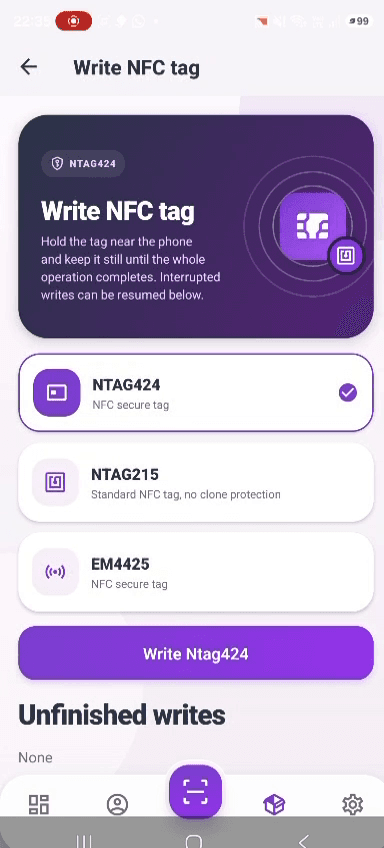
Campaigns that start with a product scan.
Bring campaigns to the moment someone scans your product. Create branded verification pages and choose which template appears by country, identifier type and labels. Priorities control which matching template wins.
- 01Three page formatsUse the visual builder, custom HTML or a protected website template. Preview the result before publishing.
- 02Context-aware templatesShow a market-specific experience or a campaign for labelled items. Country matching uses IP-based location when available.
- 03Product data in the pageInsert product fields and scan context with the supported placeholders. Review the available fields in the in-product reference.
Verify tags. Investigate suspicious scans.
Verify secure tags and give your team the evidence to investigate. Fraud alerts combine scan history with configurable detection rules. A suspicious signal supports investigation; it does not alone establish that a physical product is counterfeit.
- 01Patterns beyond a failed scanDetect counter regression, implausible travel, scan spikes, bursts of invalid reads and scans outside configured markets. Location and IP signals depend on available enrichment.
- 02A review queue for the teamInspect the alert, score, signals and related scans. Acknowledge it, dismiss it or mark it confirmed.
- 03Connect detection to actionUse the fraud-detected trigger to notify your team or run a configured response. Analyse valid and invalid scans by time, location and device.
Turn product interest into a conversation.
Keep the conversation going after the purchase. Collect information through forms and connect it to configured follow-up actions. Build registration, feedback or service-request journeys around your own process.
- 01Flexible formsUse required or optional fields and configure whether a workflow form can be submitted again.
- 02Branded emailSend workflow email using your configured sender and templates. Connect confirmations to submitted information.
- 03Labels for targetingSegment products and their identifiers with labels. Use these labels in workflows and template-selection rules.
From scan to response, with rules your team controls.
Build visual workflows for verification, form submission, product creation, product blocking, incoming webhooks and detected fraud.
- 01Six triggers, ten action typesBranch on conditions, show forms, send email, wait, update fields, label products or identifiers, notify, call HTTP endpoints or block access.
- 02Test and inspectRun a workflow test and inspect execution steps. Set scope, priority and rate limits before enabling a process.
- 03Reuse and restoreCopy workflows between product lines, inspect saved versions and restore an earlier version when a change needs to be reversed.
Connect product events to your existing systems.
Use REST APIs and workflow HTTP requests to connect Hashentic with your CRM, ERP or other services. Each integration needs its own field mapping and configuration.
- 01Incoming signed webhooksStart workflows with HMAC-verified requests, timestamp checks and nonce replay protection. Test the request format before connecting a sender.
- 02Outgoing HTTP actionsConfigure the destination, headers, body, timeout and expected status range. Use response data in later workflow steps.
- 03Scoped API tokensControl programmatic access through permissions and token expiration. Configure your email service for automated messages.
Prepare NFC labels and printed identifiers in one platform.
Hashentic supports EM4425, NTAG424 DNA and NTAG215, alongside QR and GS1 identifiers. Secure tag verification and a simple product-information link serve different purposes.
- 01NFC preparationUse the desktop writer and compatible reader to configure supported tags. Validate the finished label and target phones before production.
- 02Barcode generationCreate QR codes and GS1 identifiers from product records. Choose the appropriate encoding for your packaging and scanning process.
- 03PDF label sheetsExport barcodes with configurable captions and page layouts for printing. Check print quality and readability on the finished packaging.
Give each team member the access their work needs.
Manage access through roles, permissions and assigned product lines. Authentication settings and enabled capabilities depend on the deployment and licence configuration.
- 01Permissions and product scopeLimit the actions a user can perform and the product lines they can access. Apply permissions to API access too.
- 02Two-factor authenticationConfigure two-factor authentication and supported sign-in options, including Google authentication where enabled.
- 03Separate product and identifier controlsBlock a product or a particular authentication identifier. Review scan history and product transactions when investigating a change.
Keep product data structured and reusable.
Configure fields, reusable presets and shared lookup collections. Build a data model for your category and decide which information appears in each operating step.
- 01Presets as a starting pointReuse a field and template configuration when creating a product line. Existing product lines retain their own configuration.
- 02Shared lookup valuesManage common dropdown values and import lookup collections from CSV or Excel. Reduce inconsistent manual entries.
- 03Machine-readable passportsPublish public passport data as JSON-LD. Combine shared product-line data with item-specific values; validate the data against applicable requirements.
Recover failed bulk jobs without starting the whole job again.
Manage products and their identifiers in a searchable registry. Track batch operations and deal with individual errors from the operation details.
- 01Retry the failed itemsFor barcode creation and bulk updates, inspect failed rows, correct their data and requeue selected items or all failures.
- 02Labels with bulk controlsApply or remove labels across a selection. Bulk label operations support cancellation and undo.
- 03Usage you can plan aroundReview configured licence features and quotas for products, identifiers, users, workflows and monthly services. Capacity depends on the agreed deployment.
See reader status and writing progress as work happens.
The desktop application and admin exchange status updates so operators can follow tag writing and ongoing jobs. Recovery options depend on the operation and recorded status.
- 01Reader feedbackSee connection state, detected tags and write results while preparing labels.
- 02Progress by itemFollow pending, active, completed and failed records. Use the status to decide what needs attention.
- 03Continue unfinished workInspect an unfinished writing session before resuming. Check physical tags when a disconnection leaves the write result uncertain.
Describe the process. Review the AI draft. Refine it visually.
AI can draft a new workflow or modify an existing one from an instruction. It also assists with product setup, field suggestions and page templates. Availability depends on the AI configuration and licence.
- 01Generate and modify workflowsDescribe a process in natural language. Review the generated nodes and conditions in the visual editor before saving and enabling it.
- 02Draft product setupGet field, page and tag-placement suggestions from a product description. Check recommendations against supported chips and physical label tests.
- 03Keep your team in controlReview generated copy, data and regulatory references. AI suggestions do not establish compliance or verify supplier claims.
See the platform on your category — in 30 minutes.
Bring an advertising, brand-protection or engagement scenario. We will build the pilot around it.