[H]Hashentic
CONNECTED PRODUCTS

Promote. Protect.
Engage.

Turn every product into a channel for advertising, anti-counterfeiting and customer engagement. Connect scans to relevant campaigns, secure checks and useful conversations.

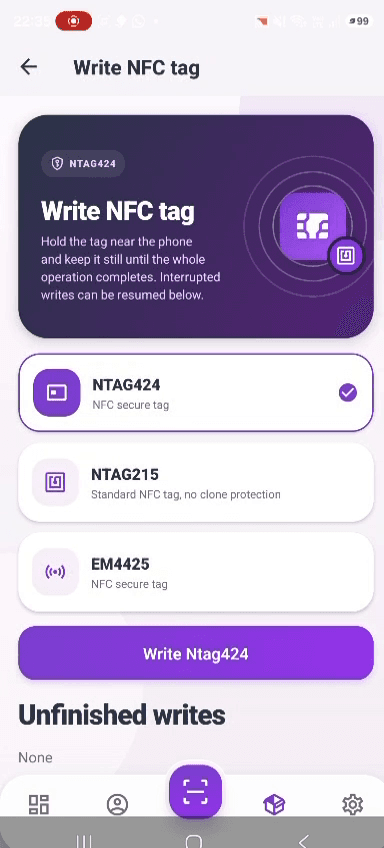
Supported chipsEM4425 · NTAG424 DNA · NTAG215 →
EM4425SECURE NFC
NTAG424DNA NFC
APIINTEGRATIONS
EU DPPDATA
[H] HASHENTICREADY
TAP PRODUCT TO VERIFY
NTAG424 DNA · AES-128
[H] HASHENTICVERIFIED
[H]
PRODUCTPremium Sneaker
ORIGINItaly
UID0x4F2A...8B1C
NFCNTAG424 Verified
STATUSAuthentic
View Full Passport
[VERIFIED]
NTAG424 DNA
Ads · Anti-counterfeiting · User engagement
Ads · Anti-counterfeiting · User engagement ·

Three directions. One connected product.

Ads

Bring campaigns to the moment someone scans your product.

  • Branded pages for offers and launches
  • Select content by market and product labels
  • Analyse scans by time, location and device
Explore product campaigns

Anti-counterfeiting

Verify secure tags and give your team the evidence to investigate.

  • Cryptographic NFC checks with EM4425 and NTAG424 DNA
  • Detect repeated messages and suspicious scan patterns
  • Review alerts and configure the response
Explore brand protection

User engagement

Keep the conversation going after the purchase.

  • Registration requests, feedback and service forms
  • Follow-up email and notifications through workflows
  • Connect responses to your CRM through the API
Explore customer engagement

The product relationship often ends too soon.

01

Campaigns have little context once the product leaves the store.

02

Copied identifiers and suspicious scans put brand trust at risk.

03

Feedback and service requests arrive disconnected from the product.

Connect the campaign, the authenticity check and the customer conversation.


The tools behind all three directions.

Start with a product identity. Use it to show the right page, check the supported security evidence and connect a customer's response to the next action.

01

Product identity and data

Link NFC or QR to a product record. Add passport data when it serves the product and your project.

02

Pages for the right context

Choose branded templates by country, identifier type and labels. Publish the campaign or information your audience needs.

03

Forms, workflows and integrations

Collect a response, notify the team and update connected systems through configured actions.

Choose the business outcome, then configure the tools around it.

From physical product to digital experience.

01

Assign a Secure Digital Identity

Choose EM4425 or NTAG424 DNA for cryptographic tag verification, or NTAG215, QR and GS1 identifiers for product access. Bind the chosen identifier to a product record.

02

Register Product Data

Create shared product data and item-specific fields for origin, materials, documents and lifecycle updates. Your team supplies and reviews the information.

03

Verify, Engage & Update

A compatible phone opens the product page in its browser. Hashentic performs the checks supported by the identifier and can show a selected template, collect a form or trigger a configured workflow.

04

Gain Insights & Control

Review verification history, scan analytics and fraud alerts. Investigate exceptions, update records and configure the response your team needs.

A tap. A check. A connection.

See a secure NFC tap become a product experience on the customer's phone.

Animated preview
01Tap the product02Verify the tag03Open the experience
Illustrated secure-tag flow. Product details come from the brand; no physical tag is read.
KILLER FEATURE

Every scan becomes an automated touchpoint.

A genuine NFC tap is the most engaged moment in a product's life. Hashentic's no-code workflow engine turns it into action — verify, decide, and respond in real time. Collect data, send branded email, flag fraud, or notify your team, all without writing a line of code.

Animated preview
01 / TriggerProduct scan
Connected sneaker[H]NFC
NFC / QR
02 / ConditionChoose the audience
Scan countryIT
Condition matched
Otherwise: continue the product page
[H]
03 / ActionShow the campaign form
Wait for the customer's submissionResponse received
04 / ActionPass on the response
Send the submitted fields to your system
  1. Product scan. A customer opens the product page through NFC or QR.
  2. Choose the audience. Check the country in the scan context against the configured market.
  3. Show the campaign form. Collect an optional expression of interest and the configured consent.
  4. Pass on the response. Send the mapped fields to your system through an HTTP request after submission.
Illustrative configuration. The matched branch waits for form submission; HTTP delivery runs only afterward. Nothing is submitted here.

No-code workflows

Trigger, condition, and action on a visual canvas — no engineers required.

  • 6 event triggers
  • Conditional branches
  • 10 action types

Engage customers

Forms and branded email, fired automatically the moment a product is verified.

  • Inline customer forms
  • Automated email
  • Product and identifier labels

Catch fraud

Detect suspicious patterns, review alerts and run the response you configure.

  • Risk signals and scoring
  • Alert review queue
  • Fraud-triggered workflows

Connect your stack

Webhooks and API calls into your CRM, ERP, or data warehouse.

  • Outbound HTTP requests
  • Inbound webhooks
  • Scoped API tokens
AVAILABLE NOW

From an idea to a draft you can refine.

AI can draft a new workflow or modify an existing one from an instruction. It also assists with product setup, field suggestions and page templates. Availability depends on the AI configuration and licence.

hashentic://describe
> PRODUCT DESCRIPTION

Italian leather sneaker, limited edition of 500 pairs, sold across EU and UK, premium resale market.

_
[H] HASHENTIC AIEXAMPLE DRAFT
CHIPNTAG424 DNA
PLACEMENTInside tongue
LAYOUTBranded product page
DATA FIELDS9 selected
LOCALESChosen language
REVIEWData and requirements

Page drafts

Generate page content and a layout from a product description, then edit the result for your brand.

    Suggested fields

    Get suggestions for product fields. Your team checks required data and supplies verified values.

      Chip and placement guidance

      Use AI recommendations as a starting point, then check supported chips and test the finished label.

        Generate and modify workflows

        Describe a process in natural language. Review the generated nodes and conditions in the visual editor before saving and enabling it.

          Your brand, not ours.

          Ship Hashentic as your own. Swap in your logo, colors, domain, and sender name — and turn off 'Powered by Hashentic' entirely. Your customers see your brand, from the login screen to the verification page.

          • Logo & faviconLight + dark, full + compact
          • Brand colorsPrimary + accent theming
          • Your domainbrand.hshntc.com or your own
          • Email senderMail from your name
          • Policy linksYour privacy, terms, support
          • 'Powered by'Off — fully unbranded
          BRAND KIT
          ACME
          Primary · Accent
          acme.hshntc.com
          Powered by HashenticOFF
          ACME
          Verified

          About the platform

          What is Hashentic?

          Run campaigns on product pages, verify secure NFC tags and build customer journeys. Use pages, forms, workflows and analytics to connect all three priorities.

          Learn more
          How do product advertising campaigns work?

          A product scan opens a branded page with the offer or launch content you configure. Choose templates by country, identifier type and product labels, then analyse scan activity. Forms and workflows can connect interest to follow-up actions.

          Learn more
          Do customers need to install an app?

          Customers open the verification page in their browser by tapping an NFC tag with a compatible phone or scanning a QR code. The phone must support the chosen data carrier.

          Learn more
          How does secure NFC differ from a static QR code?

          A static QR code links to a page and can be copied. EM4425 and NTAG424 DNA provide cryptographic data that Hashentic checks for invalid responses and replay attempts.

          Learn more
          How does Hashentic support digital product passports?

          Hashentic provides product identifiers, configurable data fields and branded passport pages. Your product category determines the applicable requirements and the data your team needs to verify.

          Learn more
          Can we use our own brand and existing systems?

          You can configure branding and a custom domain, then connect your systems through REST APIs and webhooks. Deployment and integration options can be discussed during a demo.
          Learn more

          Ready to connect your products to your customers?

          Bring an advertising, brand-protection or engagement scenario. We will build the pilot around it.

          Oleg Rutkowski · CEO, Xordex Ventures · sales@xordex.org

          Talk to our tech experts

          Whether you need a demo, want to discuss integration, or have compliance questions — we are here to help.

          Oleg Rutkowski

          CEO, Xordex Ventures

          sales@xordex.org

          Talk to our tech experts