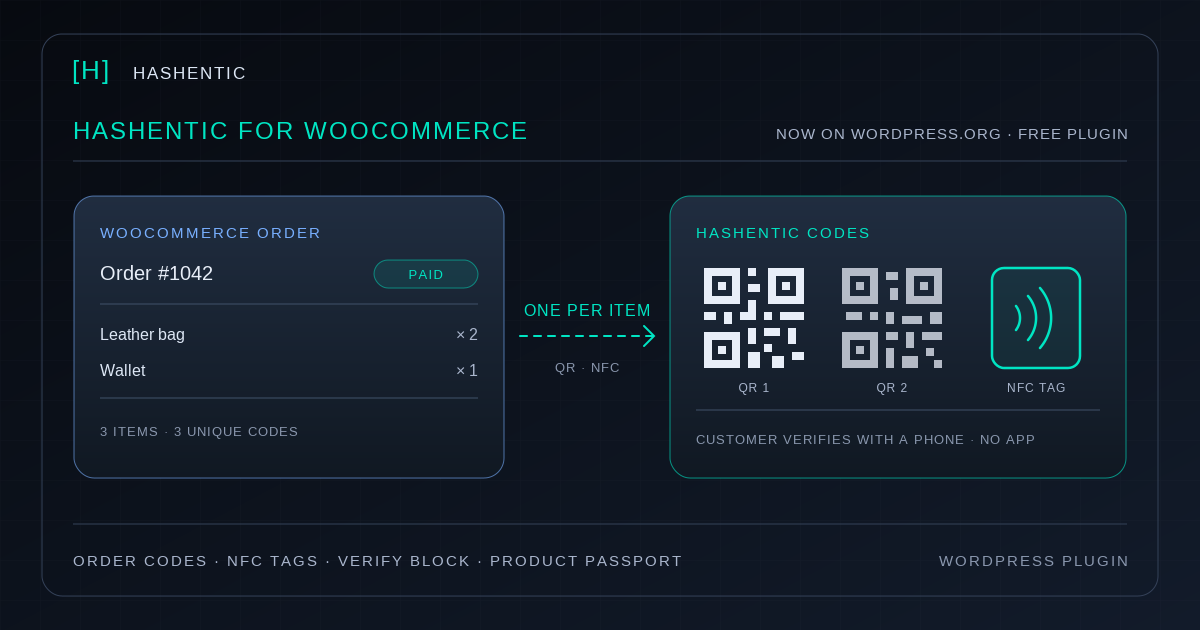
Hashentic for WooCommerce has been approved by the WordPress.org plugin team and is available in the WordPress Plugin Directory. Install it from your WordPress admin, connect the store, choose the products to protect and every item of them you sell gets its own verifiable identity: a unique QR code or a secure NFC tag that a customer checks with a phone.
The plugin is free. It connects your store to a Hashentic account, and you can create that account, with a free trial, without leaving WordPress.
What the plugin does
- Unique codes per order. When an order with a protected product is paid, every item gets its own code. Print the codes on the packing slip from the order screen.
- Secure NFC tags. With NFC on, tags are written with the Hashentic mobile app when the order is packed. NTAG 424 DNA tags sign every tap, so a copied tag is detected.
- Code batches. Issue codes for stock you label before it is sold and download them as CSV for your label printer.
- Verify authenticity block. Protected products get an "Authenticity" tab on the product page. The
[hashentic_verify]shortcode places the block anywhere. - Digital product passport. Fill in materials, origin, care, safety and recycling data, publish a GS1 Digital Link passport page and show it with
[hashentic_passport]. - Refunds and cancellations. Codes of cancelled or refunded items are released automatically. Codes on items already delivered stay valid.
The plugin supports High-Performance Order Storage (HPOS) and the cart and checkout blocks.
How it works
- Install Hashentic for WooCommerce from Plugins Add New in WordPress, or from WordPress.org.
- Connect the store under WooCommerce Hashentic. Create a Hashentic account with your e-mail address, or paste a connection key from an account you already have.
- Protect a product. Edit the product, open the Hashentic tab and tick Protect with Hashentic. Variations become variants of the same product line.
- Sell as usual. When the order is paid, each item gets its code. Open the order, print the packing slip with codes and put a code on each item.
- Your customer verifies. They scan the QR code with the phone camera or tap the NFC tag. No app is needed.
By default codes are created when the order is paid (status Processing). You can switch this to completed orders in the plugin settings. Very large orders are the exception: if any line has more than 1,000 protected items, or the order has more than 250 protected lines, the whole order gets no codes automatically, including its other items. Issue code batches on the products instead.
QR code or NFC tag
You choose the code type per product.
| QR code | NFC tag | |
|---|---|---|
| Where the code comes from | Printed on the packing slip or a label | Written to a blank tag at packing |
| What you need | A printer | The Hashentic mobile app and NFC tags |
| Copy protection | Hashentic flags codes that are scanned in unusual patterns | NTAG 424 DNA signs every tap, so a copied tag fails |
Swipe or scroll horizontally to compare columns.
For NFC products the order shows a packing code. Scan it in the Hashentic mobile app under Pack order and write a blank tag for each item. NFC tags depend on your Hashentic plan.
Product passports from the product editor
Each protected product has an Edit passport button. Choose the category, fill in the required fields and publish. The passport gets a public page at your Hashentic address, addressed by the product GTIN in the GS1 Digital Link format, and a block on your product page.
If your plan includes AI, Fill empty fields with AI suggests values from the product description. Check them before you publish.
What Hashentic receives from your store
The plugin sends only what is needed to issue and verify codes:
- Products you protect: titles, image addresses, brand and variation names.
- Paid orders with protected products: the order ID and number, ordered products and quantities, refunded quantities.
- Passport data that you enter.
- AI suggestions: when you click Fill empty fields with AI, the product name and description (up to 4,000 characters). Hashentic passes them to the AI provider named in its Privacy Policy.
- Sign-up from the plugin: the e-mail address you enter, the confirmation code, the store address and name, and the admin language.
Customer names, addresses, e-mail addresses and payment data are never sent. Nothing is sent before you connect the store or start a sign-up.
On a staging copy of your store the plugin pauses. It remembers the address it was connected on and makes no calls to Hashentic from another address until you confirm that the store moved, so a copy never changes your live data.
What it costs
The plugin is free and all of its screens and settings are available on every plan. Hashentic plans are billed by Hashentic. A new account starts with a free trial, and every plan has monthly limits. Some features, such as NFC tags and AI suggestions, depend on the plan. Current plans and limits are on the licence page.
Frequently asked questions
Is the Hashentic for WooCommerce plugin free?
Yes. The plugin is free and open source (GPL). You need a Hashentic account to issue codes. A new account starts with a free trial.
When does an order get its codes?
When the order is paid (status Processing), or when it is completed if you choose that in the plugin settings. Orders on hold, such as bank transfer or cash on delivery, get codes when they reach that status.
What happens to the codes when an order is refunded?
Codes of refunded or cancelled items are released automatically. Codes on items that were already delivered stay valid.
Do my customers need an app?
No. A QR code opens in the phone camera and an NFC tag opens when the phone is held to it. The Hashentic mobile app is only for your team, to write NFC tags at packing.
Does it work with HPOS and the block checkout?
Yes. The plugin supports High-Performance Order Storage and the cart and checkout blocks.
I already use Hashentic. Can I connect my account?
Yes. In the Hashentic admin panel, open System Applications, find the WooCommerce store card, enter your store address and create a connection key. Paste the key under WooCommerce Hashentic in WordPress.
Get started
Install Hashentic for WooCommerce from the WordPress Plugin Directory and protect your first product today. The step-by-step instructions are in the user guide chapter Use Hashentic with WooCommerce. Questions about your store? Talk to us.
Read the guide chapter