NFC authentication is a way to check that an NFC tag is the registered original and not a copy. A secure chip in the tag produces a new, cryptographically signed message every time a phone reads it, and a server checks that message before showing a result. The server accepts each message only once, so a link copied after the check fails.
That is different from simply storing a web address on an NFC sticker. Any NFC tag can open a page. Only some can prove which tag was tapped. This guide explains the difference, how the check works step by step, which chips support it and where its limits are.
What is NFC authentication?
NFC (near-field communication) lets a phone read a small chip from a few centimetres away. Authentication means proving identity, not just stating it. Put together, NFC authentication is a tap in which the chip proves that it holds a secret key, without ever revealing the key.
The term is used for two different things:
- Product authentication. A tag on a bottle, bag or box proves it is the tag the brand registered for that item. This is the subject of this guide.
- User authentication. A card, security key or phone proves who a person is when they open a door or sign in. The cryptographic idea is similar, but the goal is a person's identity, not a product's.
For products, the question is always the same: when a customer taps this item, what exactly has been checked?
Identification vs authentication
An ordinary NFC sticker carries a fixed link. Tapping it identifies a product record: "this link belongs to bottle 4821". It does not show that the sticker is the original one. Anyone can read that link with a phone and write it onto a blank tag.
A secure NFC chip changes its message on every read and signs it with a key that cannot be read out. Copying what the chip said last time does not help, because the server expects something new.
| QR code | Static NFC | Secure NFC | |
|---|---|---|---|
| Typical carrier | Printed code | NTAG213, NTAG215 | NTAG424 DNA, EM4425 |
| What it holds | A fixed link | A fixed link | A link that changes on every tap |
| Can the data be copied? | Yes, with a camera | Yes, with a phone | Yes, but the message is accepted only once |
| What the server can check | That the record exists | That the record exists | That this chip produced this tap |
| Honest wording of the result | "Product found" | "Product found" | "Tag verified" |
Swipe or scroll horizontally to compare columns.
QR codes and static NFC are still useful for product information, instructions and campaigns. They become a problem only when the page says "genuine" although nothing was verified. The comparison NFC vs QR codes for product authentication goes deeper into when each one is enough.
How NFC authentication works, step by step
- A key is created for the tag. Before the tag is attached, a unique secret key is generated and written into the chip. The server keeps its own protected copy. The chip offers no command to read the key back.
- The tag is attached to the product and linked to its record: model, batch, serial number, whatever the brand tracks.
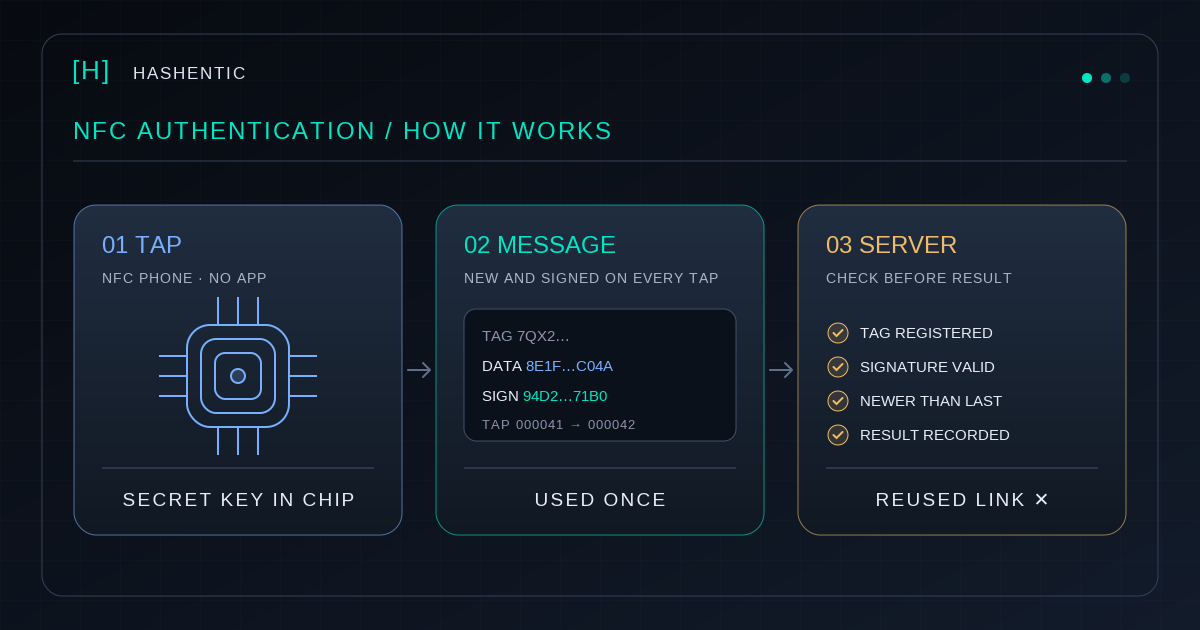
- A customer taps the tag. The phone reads it the way it reads any NFC link. No app is involved.
- The chip builds a fresh message. It combines its identifier with a value that changes on every read and signs the result with its key. The link the phone opens therefore differs from tap to tap.
- The server checks the signature. It finds the tag's key, repeats the calculation and compares. One wrong bit fails the check.
- The server checks freshness. The changing value must be newer than the last one accepted. A link that was already used, or an older one, is rejected.
- The result page opens. The customer sees the product page and whether the tag passed. The check is recorded, so the brand gets a history of scans for each item.
The phone does no cryptography and stores no keys. Everything that matters happens inside the chip and on the server. For the protocol details on one specific chip, see NTAG424 DNA explained: how SUN authentication works.
Which NFC chips support authentication
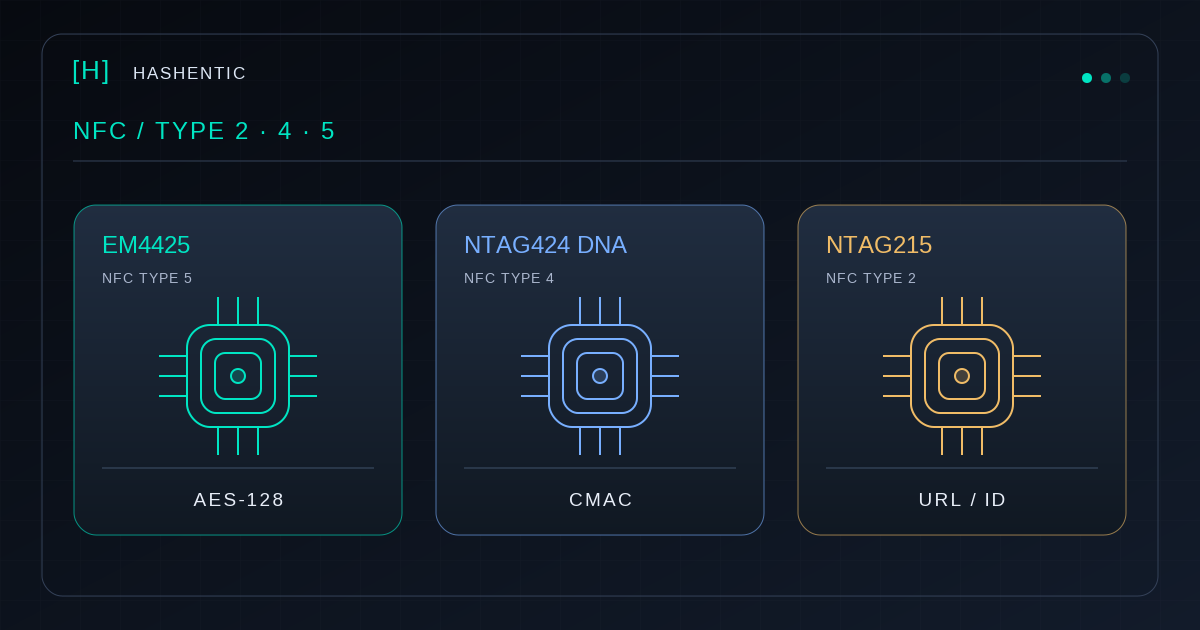
The chip decides what can be proven. Hashentic supports three, with different jobs:
| Chip | NFC type | What the check covers |
|---|---|---|
| NTAG424 DNA (NXP) | Type 4, ISO/IEC 14443-A | AES-CMAC authentication code and a read counter on every tap |
| EM4425 (EM Microelectronic) | Type 5, ISO/IEC 15693 | Cryptographic response and a changing security token |
| NTAG215 (NXP) | Type 2, ISO/IEC 14443-A | Identifier lookup only, not a cryptographic check |
Swipe or scroll horizontally to compare columns.
NTAG424 DNA and EM4425 are authentication chips. NTAG215 is an identification chip: good for opening product details, not for proving a tag is genuine. The supported-chip guide compares them in detail, and the technology overview links to the manufacturers' documentation.
What the customer needs
A phone with NFC switched on. Android phones with NFC read link tags natively. iPhone XS and later read them in the background, as described in Apple's Core NFC documentation; older iPhones need an app or the system NFC scanner.
The verification page opens in the browser, so there is nothing to install and no account to create. An app is needed only by the staff who write tags; see how tag writing works.
What NFC authentication proves, and what it does not
A passed check proves one thing: a chip holding the registered key produced this message, and the server had not accepted it before. That is strong evidence about the tag. What it says about the product depends on how the tag is attached.
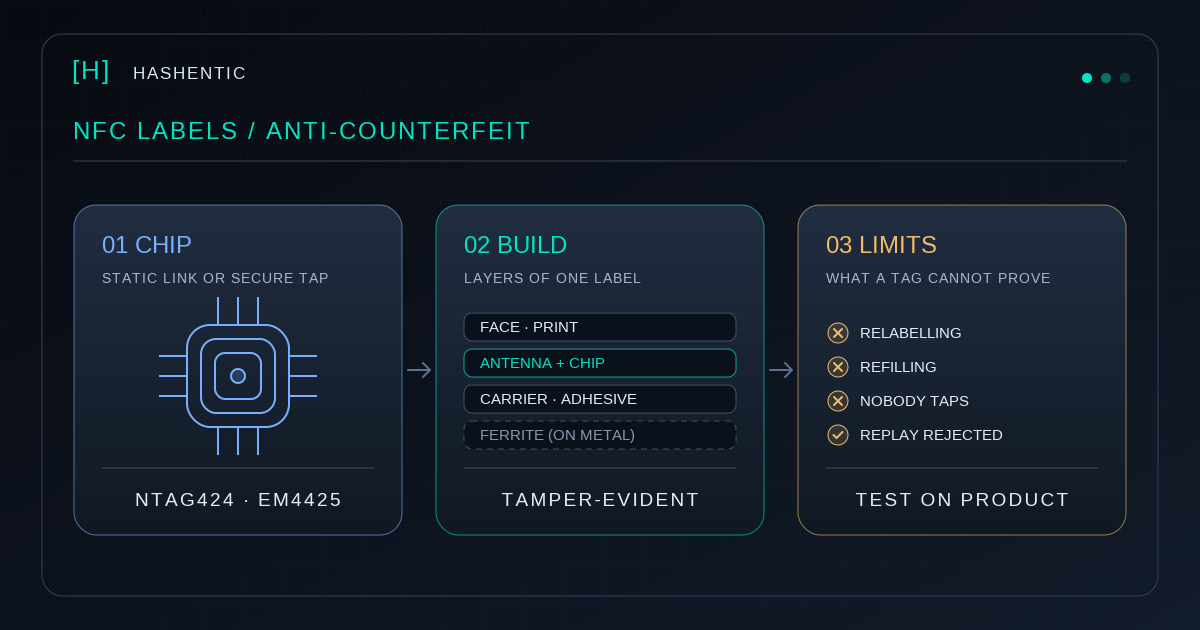
A genuine tag that is peeled off and stuck onto a fake still verifies. A link captured from a tap and never opened can be used once, until the server accepts a newer tap. And no chip can tell whether a bottle was refilled. Label construction, placement and a tamper-evident build matter as much as the chip.
Three practical consequences:
- Design the label with the product. A tag under a closure, inside a seam or in a destructible label is harder to move than a sticker on a box. See NFC anti-counterfeit labels.
- Say what was checked. A page for a static tag should not use the same "verified" wording as a page for a secure tag.
- Watch the pattern, not only the single tap. Many failed checks on one tag, or taps of the same item in distant places within hours, are signals worth a review.
Where brands use NFC authentication
- At the point of purchase. A customer taps before buying or right after unpacking, for example to check a bag's authenticity.
- In returns and service. The tag check becomes one input alongside the order record and physical inspection; see NFC authentication in product returns.
- In resale and ownership. A verified tap can let a buyer register as the owner and pass the item on later; see product ownership.
- In distribution. The scan history shows where items appear, which helps to investigate grey-market diversion.
- As the carrier of product data. The same tap can open care instructions, warranty registration or digital product passport data.
How to start
Start with one product and its real packaging, not with a bare chip on a desk:
- Decide what the result must prove: a product record, or a verified tag.
- Choose the chip and the finished label for that goal.
- Write a small batch of tags and attach them the way production would.
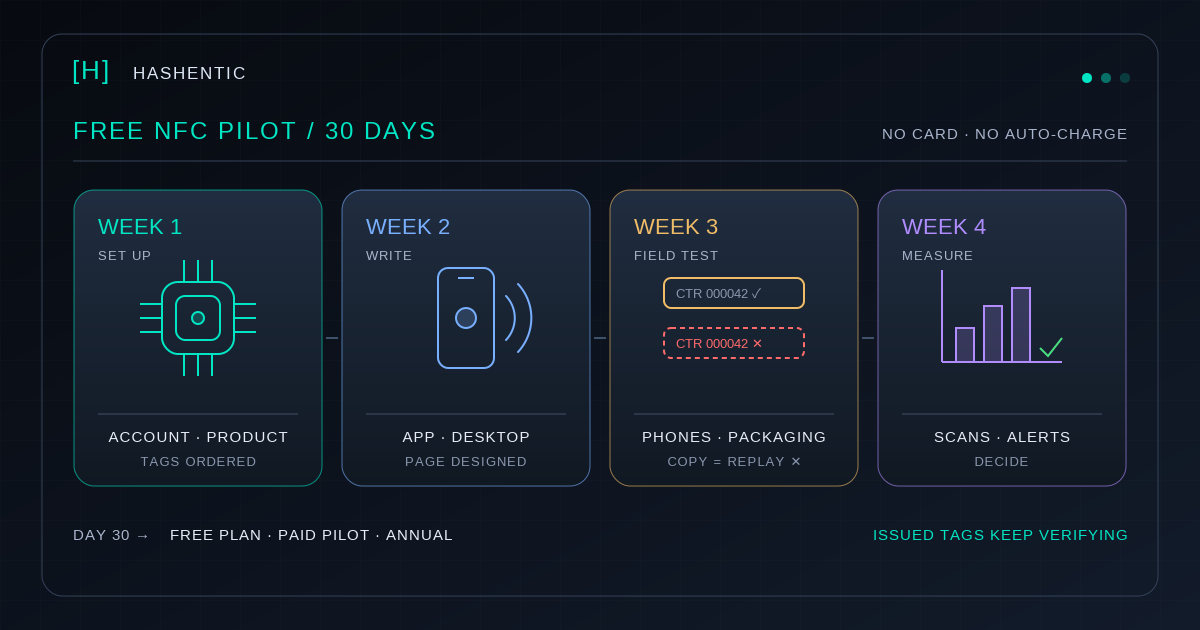
- Test a fresh tap, a reused link, a damaged tag and the phones your customers use.
- Agree what staff do when a check fails.
The NFC pilot checklist turns these steps into acceptance tests, and the free 30-day pilot lets you run them on your own products, with no card and no automatic charge. For the full customer flow and the platform features around it, see NFC product authentication.
Frequently asked questions
Can an NFC tag be cloned?
A static tag can: its link is readable and can be written onto another tag. With an authentication chip, copying the readable data gives a message the server accepts only once, so a copy used after the genuine check is rejected. Producing new valid messages would need the secret key, which the chip does not reveal. No chip should be called impossible to attack, but copying stops being a matter of a phone and a blank sticker.
Does NFC authentication need an app?
Not for the customer. The tap opens a web page. An app or a desktop utility with an NFC reader is used by staff to write and manage tags.
Does NFC authentication work offline?
The check needs the tag's key, and keeping keys on a server means they never sit inside an app that could be taken apart. Without a connection a phone can read the link but cannot tell a fresh tap from a copy.
Is NFC authentication more secure than a QR code?
A printed QR code is a fixed image, so a photograph of it is a perfect copy. A secure NFC chip produces a new signed message on every tap. A QR code with a unique serial number can flag suspicious repeated scans, but it cannot prove which physical code was scanned.
What is the difference between NFC authentication and NFC identification?
Identification answers "which record does this tag point to?". Authentication answers "is this the registered tag?". Every NFC tag can do the first. Only chips with cryptographic keys can do the second.
How long does an NFC tag last?
A passive NFC tag has no battery and takes its power from the phone's field during the tap. Its life is usually limited by the label and the way it is attached, not by the chip, so test the finished label under the conditions your product will actually meet.
Want to see the check on your own product? Request a demo with your samples and the phones your customers use.